If you have ADHD, losing things is rarely about not caring. It is the keys you put down to answer the door, the charger you moved "so it would be safe", the letter you tucked into a book because you meant to deal with it later. ADHD and losing things go together for very ordinary reasons, and most of the fixes are about making the moment of putting something down easier, not about trying harder.
This page covers why it happens, a handful of strategies people with ADHD use, and where an app to remember where you put things can fit. It is practical advice, not medical advice. If ADHD is affecting your daily life, your doctor or an ADHD clinician is the right person to talk to.
Why you lose things mid-task
Think about the last thing you lost. Odds are you put it down while doing something else. That is the pattern: an object leaves your hand during a transition, and your attention is already on the next thing.
- Working memory is busy. You were carrying three thoughts and a bag of shopping. "Keys on the microwave" never made it into memory at all, so there is nothing to recall later.
- Interruptions reset the thread. The phone rings, the kettle boils, a child calls you. Whatever was in your hand goes on the nearest flat surface.
- "Somewhere safe" is a trap. Hiding important things in a special place feels responsible. But a special place is, by definition, one you do not visit often, so it is the first thing you forget.
Object permanence and ADHD: out of sight, out of mind
Many people with ADHD describe "object permanence" problems: once something is in a drawer, a cupboard, or a box, it stops existing for them. Strictly speaking, object permanence is a child development term, and adults with ADHD know perfectly well that the drawer still has things in it. What people mean is that out of sight really is out of mind. The thing does not come back to you unless something prompts it.
So you forget you own things (and buy duplicates), and you forget where the things you do remember went. Both get easier when the information lives outside your head.
Strategies that work with ADHD, not against it
- Build a launch pad by the door. One tray or hook for keys, wallet, badge, earbuds and anything you need to leave the house. A bright tray beats a discreet one. If it is visible, it gets used.
- Give your top five items a home. Not everything, just the five things you hunt for most. For most people that is keys, phone charger, wallet, glasses and headphones. One home each, where you naturally drop them, not where they "should" go. Our guide to where to keep spare keys has ideas for the key part.
- Prefer open storage. Open shelves, clear bins, hooks and wall pockets keep things in view. Lids and opaque boxes are where things vanish.
- Body-double a tidy-up. Clearing a surface is much easier with someone else in the room, or on a video call, doing their own task. Twenty minutes is enough.
- Capture the spot in the moment. The only time you know where something is going is the second you put it there. A record made then, in under five seconds, is worth more than a perfect inventory you never finish.
- Do a weekly "return trip". Pick one day to walk round and put stray things back in their homes. Keep it small: one room, one bag. A cleared-out junk drawer is a good first target.
Why a voice jot suits ADHD brains
Strategy five is where most systems fall apart. Notes apps want you to unlock the phone, find the app, find the right note and type. By step two you are thinking about something else.
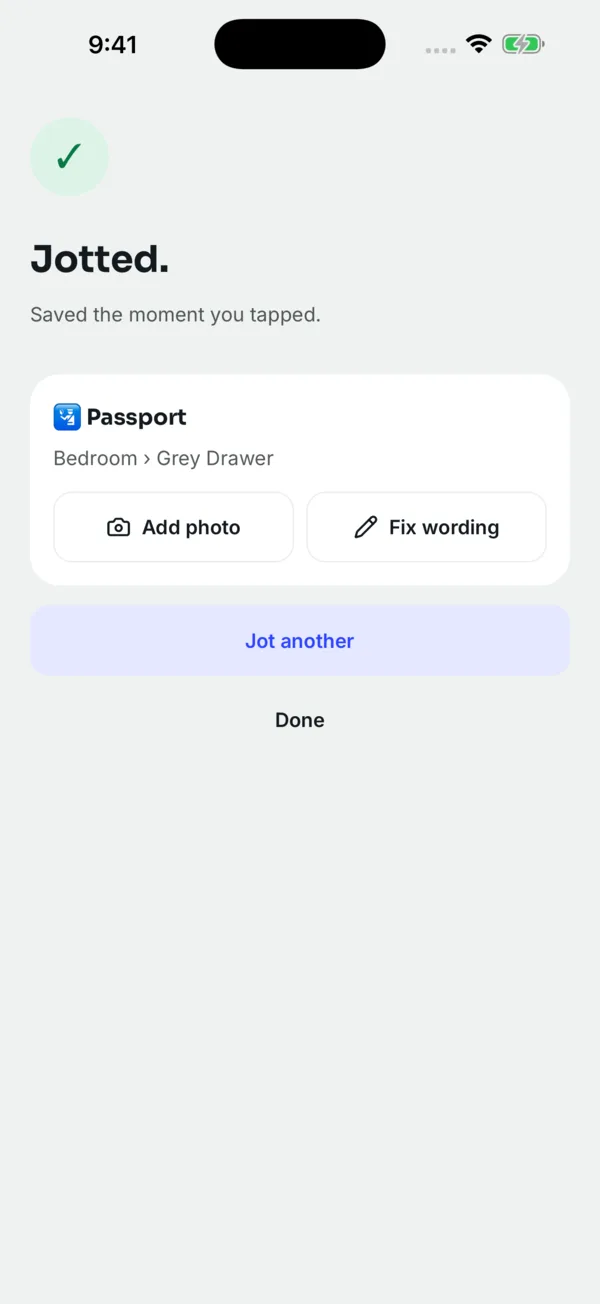
Jot the Spot is an app to remember where you put things, designed around that five-second window. You tap the mic and say it: "Passport, inside the blue folder, top shelf of the closet." It saves when you pause, with no stop button and no form. Later you ask, "where's my passport?" and it tells you the spot.
What makes it work for ADHD is the lack of friction:
- On iPhone, a Lock Screen widget or the Action Button shortcut "Jot a spot" opens straight into listening. On Android, there is a home-screen widget and a Quick Settings tile.
- You can talk normally: "I put the spare car key in the mug on the bookshelf." The app pulls out the thing and the spot. More on how that works in voice capture.
- When it moves, jot it again. Asking gives the newest spot, and the old ones stay in the history, which helps when you half-remember moving it.
- On iPhone you can ask Siri or search from Spotlight, so you do not even need to open the app. See Siri and Spotlight.
For hard-to-describe spots, a photo of the spot helps more than words: "the box behind the other box" is clearer as a picture.
The honest part: it needs one small habit
It only knows what you tell it. If you put the keys down and do not jot them, the app cannot find them, and it does not track anything with GPS or Bluetooth. The habit is narrow but real: when you put something somewhere unusual, say it out loud into your phone.
A few things make that habit easier to start:
- Begin with the "somewhere safe" items only: passport, spare keys, gift cards, important letters. These are the ones that cost hours to find.
- Put the widget where your thumb already goes.
- Do not try to log the whole house. Ten well-chosen jots beat two hundred stale ones, and the free plan covers 10 things.
If you have not jotted anything in 14 days, the app sends one gentle reminder, if you allow notifications. That is it. It does not nag, keep streaks, or make you feel bad for forgetting the app too.
Questions people ask
Why do people with ADHD lose things so often?
Mostly because things get put down during transitions, while attention has already moved on, so the location never gets stored in memory. Clutter and "safe" hiding places make it worse.
Is object permanence really an ADHD thing?
The term comes from child development, but many adults with ADHD use it to describe "out of sight, out of mind": things in drawers or boxes stop coming to mind. Keeping key items visible and writing down where hidden things went both help.
What is the best app to remember where I put things with ADHD?
The best one is the one fast enough to use in the moment. Jot the Spot is built for that: tap, say the spot, and it saves when you pause, from a widget or shortcut.
Will the app keep reminding me to use it?
No. It sends one gentle reminder if you have not jotted anything for 14 days and you allow notifications. There are no streaks or repeated nags.
 Download on the App Store