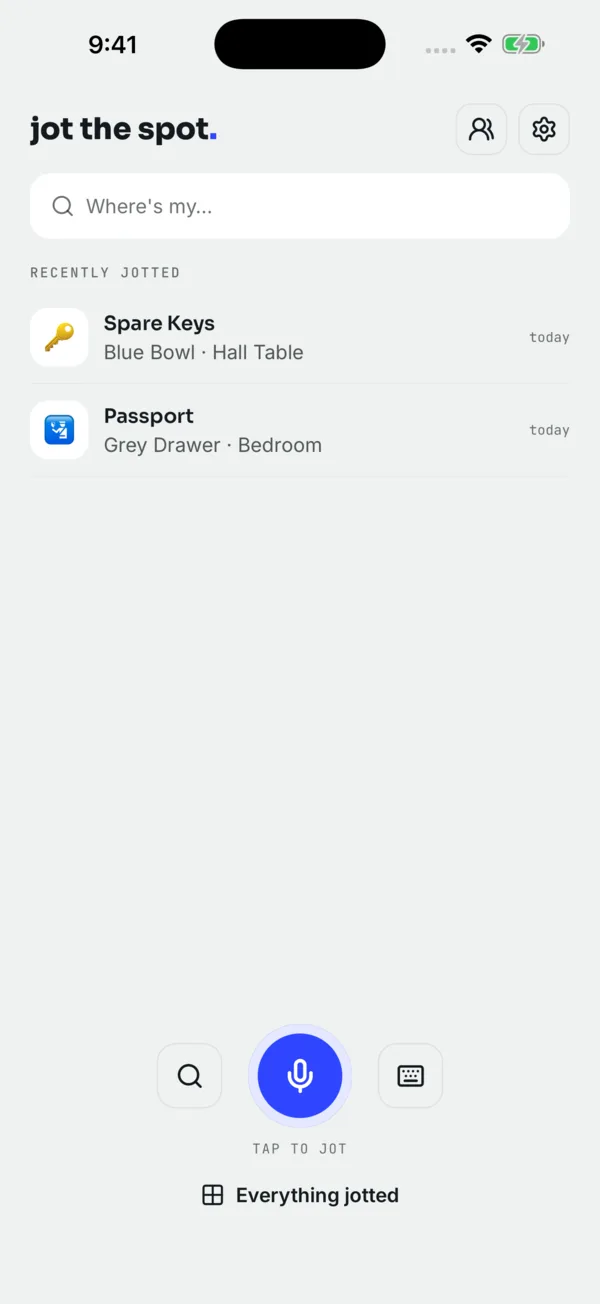
Most voice notes apps are built for ideas and shopping lists. Jot the Spot is a voice notes app to remember where you put things, and only that. You say one short sentence at the moment you put something away, and later you ask for it back. The trick is that the sentence costs you about three seconds, so you actually do it.
This page explains how capture works, what makes a jot easy to find later, and the faster ways to start one without hunting for the app.
How a voice jot works, step by step
- Tap the mic. One tap, not a hold. You do not need to keep your thumb on the screen, which matters when your other hand is holding a box, a bag of shopping or a sleeping toddler.
- Say the thing, the spot and the area. "Spare key, blue bowl, hall." Or say it as a normal sentence: "I put the spare keys in the blue bowl on the hall table." The app pulls out the three parts for you.
- Stop talking. There is no stop button. When you pause, it saves.
- Check the card. You see what it heard, split into the thing, the spot and the area. If a word came out wrong, tap and fix the wording.
- Changed your mind? An Undo button stays on screen for 6 seconds after saving. Tap it and the jot is gone, as if you never said it.
Microphone access is optional. If you would rather not talk (a quiet office, a sleeping house, a noisy train), type the same sentence instead. Typing works everywhere voice does.
What makes a good jot
The best jot is the one you would want to hear if you were standing in the hallway with your coat on, late. A few habits make a big difference.
Name the thing the way you will ask for it
If you call it "the big suitcase" at home, jot "big suitcase", not "Samsonite 75 cm spinner". Search is forgiving about spelling, but it cannot guess that "the good scissors" and "fabric shears" are the same thing unless you said one of them.
Give the spot something you can see
"Bedroom" alone sends you on a search. "Shoebox on the top shelf of the bedroom closet" sends you to one place. Colors, containers and shelf positions are the details that save time: "grey document wallet", "red toolbox", "second drawer down".
Say the area every time
Many homes have two of everything: two junk drawers, two closets, a shed and a garage. Adding "kitchen", "garage" or "loft" costs one word and removes the doubt.
| Vague jot | Better jot | Why it helps |
|---|---|---|
| "Passport, safe place" | "Passport, grey document wallet, bottom drawer of the bedroom desk" | "Safe place" is exactly what you forget. |
| "Christmas lights, attic" | "Christmas lights, clear box marked LIGHTS, left of the attic hatch" | Attics hold many boxes; the label and side narrow it down. |
| "Drill, garage" | "Cordless drill, red toolbox, under the garage workbench" | Big rooms need a container or landmark. |
| "Spare charger" | "Spare laptop charger, side pocket of the black backpack, hall closet" | Without a spot it is just a note that you own a charger. |
When something moves, jot it again
You do not edit the old jot. Just say the new spot: "Passport, travel bag, front pocket." When you ask later, you get the newest spot first, and the full history of places is still there if the newest one turns out to be wrong. That history is surprisingly useful after a trip or a house move, when things rarely go back where they were.
Faster ways to start a jot
The fewer taps between putting something down and speaking, the more likely you are to bother. Jot the Spot has a few shortcuts so the mic is one press away.
- iPhone: a Lock Screen or Home Screen widget, the Action Button set to the "Jot a spot" shortcut, and the same shortcut inside the Shortcuts app.
- Android: a home-screen widget, a Quick Settings tile you can add to your pull-down panel, and Jot and Ask shortcuts when you hold the app icon.
On iPhone you can also ask Siri and search from Spotlight; see Siri, Spotlight and shortcuts for what each one does.
Where the recording goes
Capture works offline using your phone's own speech recognition and a parser that runs on the device. When you are online, the recording may be sent to a transcription service for a more accurate transcript, and the audio is deleted right after. Jot the Spot never keeps audio. Some phones or languages do not offer offline speech recognition; typing always works. The full picture is on offline and private.
The honest limit: it only knows what you tell it. If you put something down without jotting it, or someone else moves it, the app still points at the last spot it heard about.
Who gets the most out of voice capture
People who lose things mid-task, which is most of us. It is especially handy if you have ADHD and things vanish the moment they leave your hand (see ADHD and losing things), if you are packing for a move, or if you store things in places you visit once a year. Jotting is free for up to 10 things; Unlimited removes the cap and adds photos, sharing and read-it-out answers. Details on pricing.
Try it on the next thing you put away. Say where it went once; ask for it when you need it.
 App Store
Free for 10 things · Unlimited from $1.67/mo billed yearly · Pricing
Questions people ask
Do I have to hold the button while I talk?
No. Tap the mic once and talk. It saves when you pause, and you have 6 seconds to undo.
What if it mishears a word?
Tap the saved jot and fix the wording. You can also type the whole thing instead of speaking.
Is a voice memo app just as good for remembering where things are?
A voice memo works if you are willing to play back recordings to find the right one. Jot the Spot turns what you say into searchable text split into the thing, the spot and the area, so you can ask for one item directly.
Do I need an account to start jotting?
No. You can jot straight away with no sign-up. An email or Google account is optional, for recovery and moving to a new phone.