Mistakes that create the cable drawer
The mystery cable drawer is not one bad decision. It is a few small habits repeated for years. If you recognize these, you can stop it refilling once you have sorted it.
Keeping every cable "just in case"
Each new device comes with a cable, and each old device leaves one behind. Without a rule, the drawer only grows. Keep one or two spares of the cables you use daily, and let the rest go to electronics recycling.
Separating a charger from its device
The camera battery charger, the beard trimmer stand and the electric toothbrush base all look generic once they are away from the thing they charge. The moment they are stored apart, nobody can match them up again.
Trusting your memory for twice-a-year chargers
You will remember where the phone charger is. You will not remember where the drone charger went after last summer, or the charger for the cordless hedge trimmer. Rare use is exactly what makes these hard.
Buying a new one instead of looking
When the right cable takes twenty minutes to find, ordering another feels quicker. Do that a few times and you have three of everything and still cannot find the one you need.
How to identify a mystery cable
Empty the drawer onto a table and work through it once. It takes about half an hour.
- Group by plug end. USB-C, Lightning, micro-USB, barrel plugs, proprietary connectors. Most mysteries are solved here: a micro-USB cable is just a micro-USB cable.
- Read the power brick. Wall chargers print their output (volts and amps) and often the brand. A brick that says the same brand as your camera probably belongs to it.
- Try it. Plug each odd charger into the devices you suspect. A charging light settles the question.
- Check for devices you no longer own. The charger for a phone you sold three years ago can go.
- Label what is left. See the next section.
Labeling chargers and cables so it stays solved
A label only needs to say what the cable is for. Two cheap methods work well:
- Flag labels. A strip of masking tape or label tape folded around the cable near the plug, leaving a small flag you can write on: "CAMERA," "KINDLE," "DRILL BATTERY." Put one at each end of long cables.
- Colored tape or bread-bag clips. Give each person or device a color. Blue for the work laptop, green for the kids' tablets. Useful when several cables are identical and you just need to know whose is whose.
Label the power brick as well as the cable. Bricks are the things that get mixed up most, and some devices need a specific output to charge properly.
The chargers you use twice a year
These are worth storing with the device, or at least saying where they went. Common examples:
- Camera battery charger and spare batteries
- Cordless garden tools and their battery chargers
- Electric toothbrush travel charger
- The old phone's cable, kept for the old phone you keep as a backup
- Spare power banks (check they still hold a charge before a trip)
- Game controller charging docks, the e-reader cable, a smartwatch puck
A small zip pouch per device works well: camera, charger and spare battery together. If the pouch has to live away from the device, that is the moment to jot it.
A travel kit that is always packed
If you travel often, a dedicated travel pouch saves the pre-trip hunt. One wall charger with two ports, one cable for each type of plug you use, a power bank, and the plug adapter for the country you visit most. It never gets unpacked into the house, so it is always ready. The only job is putting it back in the same place when you get home: "Travel charger pouch, front pocket of the black carry-on, hall closet."
For the everyday side, a fixed charging station near the door or in the kitchen stops chargers wandering in the first place. Our guide on where to keep chargers walks through setting one up.
Where Jot the Spot helps
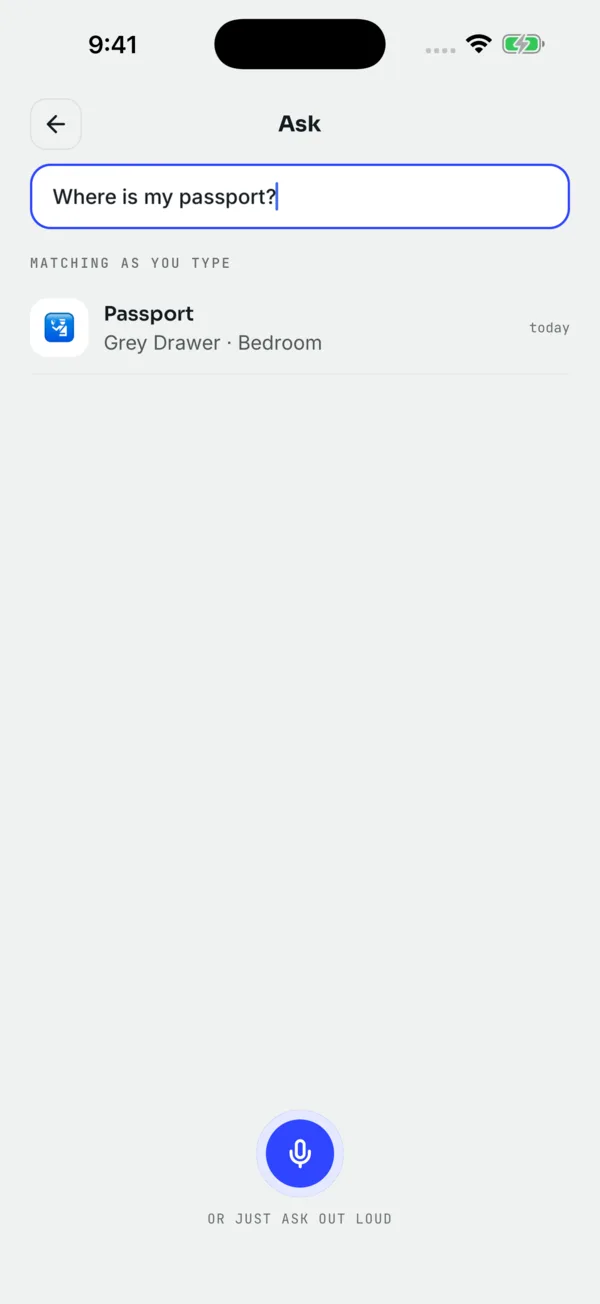
Jot the Spot is for the chargers that do not live at the charging station. When you put the camera charger away after a trip, tap the mic and say "Camera charger and spare battery, grey pouch, desk drawer in the study." Next summer, ask "where's the camera charger?" and you get that answer. If you ask "what's in the study desk drawer," you see everything you have jotted there.
Search is forgiving, so a shorter phrase or a slightly wrong spelling still finds it. If the spot is hard to describe (the third of four identical boxes on a shelf), a photo of the spot on Unlimited helps.
It does not know what is in the drawer by itself, and it cannot tell you which cable fits which device. Labels do that job. The app remembers where the labeled things went.
Questions people ask
How do I figure out what an unlabeled charger is for?
Read the brand and output printed on the power brick, match the plug shape to your devices, then test the likely candidates. Label it as soon as you know.
What is the easiest way to label cables?
Fold a strip of masking tape or label tape around the cable near the plug to make a small flag, and write the device name on it. Label the power brick too.
Should I keep old chargers and cables?
Keep the ones for devices you still own and one or two spares of everyday cables. Chargers for devices you no longer have can go to electronics recycling.
Can Jot the Spot tell me which cable fits my device?
No. It remembers where you said you put a charger or cable. Labeling the cable is what tells you which device it belongs to.
 Download on the App Store